
Why WhatsApp is South Africa’s Ultimate Business Channel
WhatsApp isn’t just for personal chats anymore. it’s become the most intimate marketing channel for businesses, with open rates exceeding 90%.
With over 2 billion WhatsApp users globally and 96% of South Africans actively using the platform, businesses that ignore WhatsApp automation are leaving money on the table. Unlike email (20% open rates) or SMS (expensive per-message costs), WhatsApp offers the perfect combination of reach, engagement, and cost-effectiveness.
The numbers tell a compelling story:
- 90%+ message open rates—compared to 20% for email marketing
- 70% of messages read within 5 minutes of delivery
- 3x higher response rates than any other communication channel
- Customers prefer messaging over phone calls by a 2:1 margin
For South African businesses facing unique challenges like load shedding, limited internet banking penetration, and diverse language requirements, WhatsApp chatbots offer a resilient, accessible solution that works on basic smartphones and mobile data.
This guide is for: Business owners, marketing managers, customer service directors, e-commerce operators, and sales teams who want to automate customer interactions and scale their operations using WhatsApp Business API.
In this comprehensive guide, you’ll learn:
- What WhatsApp Business chatbots are and how they work
- Why South African businesses have a unique advantage
- 7 industry-specific use cases with real examples
- A complete 7-step implementation roadmap
- Platform comparisons and pricing (in ZAR)
- How Wiggle Digital can help you succeed
Ready to automate your WhatsApp? Book a free consultation with our chatbot experts and discover how automation can transform your business.
What is a WhatsApp Business Chatbot?
Understanding the Technology
A WhatsApp Business chatbot is an automated software application that uses artificial intelligence and predefined rules to communicate with customers through WhatsApp messages. It can handle conversations, answer questions, process orders, and provide 24/7 support without human intervention.
How WhatsApp Chatbots Work
The process is seamless from the customer’s perspective:
- Customer sends a message to your business WhatsApp number
- Chatbot receives the message via WhatsApp Business API
- AI/NLP processes the message intent and understands what the customer wants
- Chatbot generates an appropriate response based on its training and rules
- Response is sent back to the customer via WhatsApp
- Conversation is logged for analytics and potential human handoff
Types of WhatsApp Chatbots
A. Rule-Based Chatbots
Rule-based chatbots follow predefined decision trees and trigger responses based on specific keywords. They’re best for handling FAQs and simple queries.
- Pros: Easy to build, predictable responses, lower cost
- Cons: Limited understanding, rigid conversations, can’t handle unexpected queries
- Best for: Small businesses with straightforward use cases
B. AI-Powered Chatbots
AI-powered chatbots use Natural Language Processing (NLP) and machine learning to understand context and intent. They improve over time as they process more conversations.
- Pros: Understands context, learns over time, human-like conversations
- Cons: Higher cost, requires training data, more complex setup
- Best for: Businesses with complex customer queries and high conversation volumes
C. Hybrid Chatbots
Hybrid chatbots combine the best of both worlds; using rules for common queries and AI for complex situations.
- Pros: Balance of control and intelligence, scalable, cost-effective
- Cons: More complex to build and maintain
- Best for: Most business use cases, especially growing businesses
Key Capabilities of WhatsApp Chatbots
Modern WhatsApp chatbots can:
- Send and receive text messages
- Share images, documents, and videos
- Send location information and maps
- Process payments via integrated gateways
- Schedule appointments and send reminders
- Generate and qualify leads
- Provide 24/7 customer support
- Send notifications, updates, and alerts
- Integrate with CRM and e-commerce platforms
Why WhatsApp for Business in South Africa?
The South African Advantage
South African businesses have a unique opportunity with WhatsApp automation. Here’s why:
WhatsApp Dominance in South Africa
- 96% of smartphone users have WhatsApp installed
- It’s the primary communication channel for most South Africans
- Crosses all demographics from Gen Z to Baby Boomers
- Trusted and familiar platform with high user confidence
- Works reliably even with intermittent connectivity
Unmatched Engagement Rates
| Channel | Open Rate | Response Rate | Cost per Message |
|---|---|---|---|
| 90%+ | 45-60% | R0.30-R1.20 | |
| 20-25% | 2-5% | R0.05-R0.20 | |
| SMS | 95% | 15-25% | R0.15-R0.50 |
| Phone Calls | N/A | 10-15% | R1.50-R5.00 |
Source: Industry benchmarks compiled from HubSpot, Mailchimp, and Twilio data
Key engagement statistics:
- 90%+ message open rates (vs 20% for email)
- 70% of messages read within 5 minutes
- Higher response rates than any other channel
- Customers prefer messaging over calls
Cost-Effective Communication
- Lower cost than SMS for high-volume messaging
- No per-message fees for session messages (24-hour windows)
- Reduce call center costs by up to 50%
- Automate repetitive queries that drain human resources
Personal Connection & Trust
- Conversations feel personal and direct
- Builds stronger customer relationships over time
- Higher trust factor than email marketing
- Preferred communication method for most demographics
Rich Media Support
WhatsApp supports:
- High-quality images and product photos
- Videos and video messages
- PDFs, documents, and brochures
- Voice messages
- Location sharing and maps
- Interactive buttons and lists
Official Business Presence
The WhatsApp Business API provides:
- Verified business profile with green checkmark
- Professional branding and business description
- Operating hours and contact information
- Website and product catalog links
- Business category and location
South Africa-Specific Advantages
Load Shedding Resilience: WhatsApp works on mobile data and requires minimal bandwidth, making it reliable during power outages.
No Internet Banking Required: Unlike many digital payment solutions, WhatsApp payments and integrations work without requiring customers to have internet banking.
Basic Smartphone Compatibility: Works on entry-level smartphones common in South Africa.
Rural Accessibility: Reaches customers in areas with limited internet infrastructure.
Local Language Support: Supports all 11 official South African languages plus regional dialects.
Use Cases & Applications: How Businesses Are Using WhatsApp Chatbots
Industry-Specific Use Cases
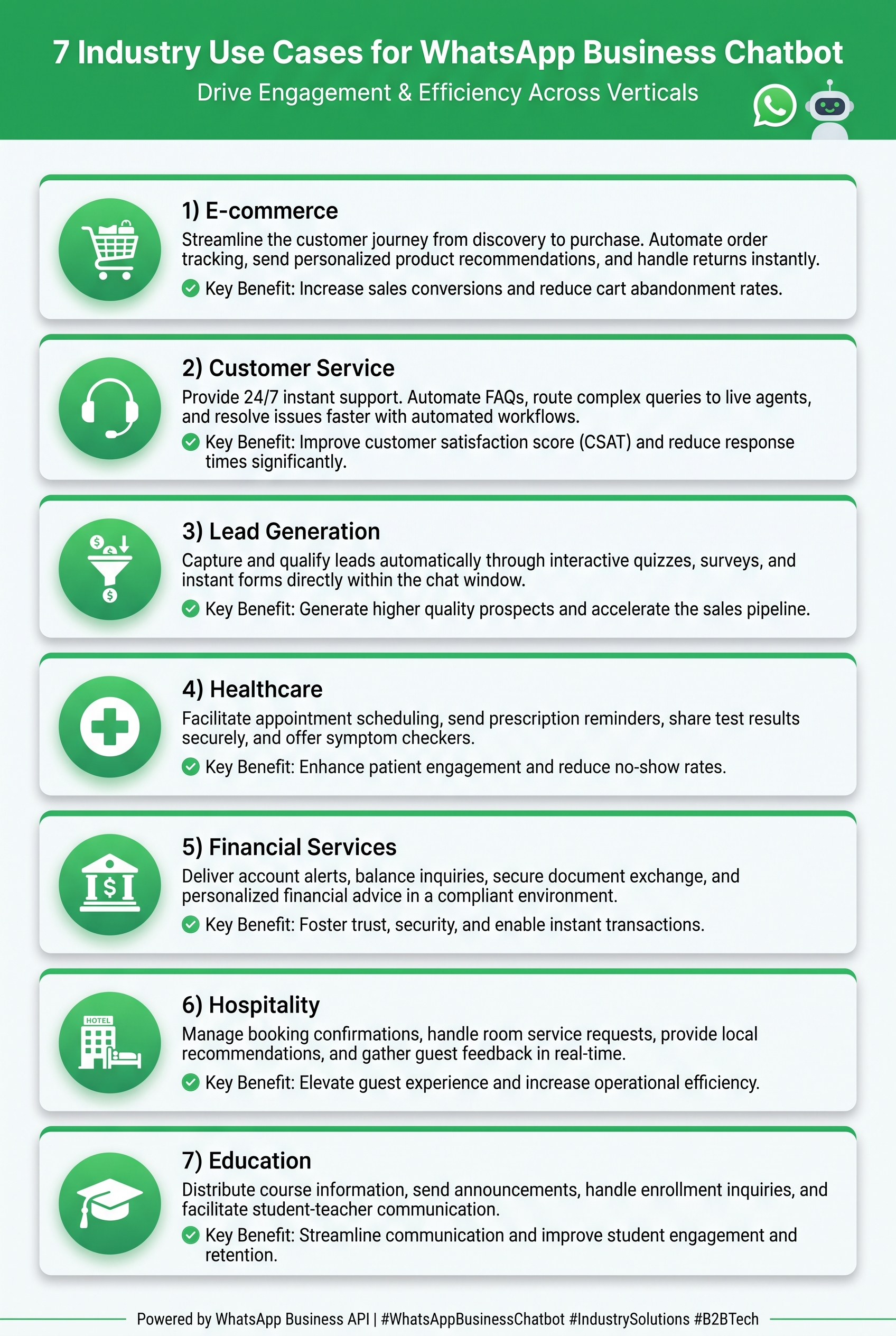
Here are 7 proven ways South African businesses are leveraging WhatsApp chatbots:
1. E-commerce & Retail
Automated Workflows:
- Order status updates and tracking
- Shipping notifications with live tracking links
- Personalized product recommendations
- Abandoned cart recovery sequences
- Return and exchange handling
- Real-time inventory queries
Real Example:
A Johannesburg fashion retailer implemented a WhatsApp chatbot that automatically sends order confirmations, shipping updates, and delivery notifications. When customers message “Where is my order?” the bot instantly provides tracking information and estimated delivery times. Result: 40% reduction in “Where is my order?” support tickets.
2. Customer Service
24/7 Automated Support:
- Instant FAQ responses
- Ticket creation and tracking
- Complaint resolution workflows
- Customer feedback collection
- Automated satisfaction surveys
Real Example:
A Cape Town telecommunications company deployed a WhatsApp chatbot that handles 80% of common queries (balance checks, package upgrades, technical troubleshooting). Complex issues are automatically escalated to human agents with full conversation context. Result: Support costs reduced by 45%, customer satisfaction increased by 35%.
3. Lead Generation & Sales
Automated Sales Funnel:
- Lead qualification through conversational forms
- Product information and brochure sharing
- Instant quote generation
- Appointment scheduling for sales calls
- Demo booking and reminders
Real Example:
A Durban-based insurance broker uses a WhatsApp chatbot to qualify leads. When prospects ask about pricing, the bot asks qualifying questions (age, coverage needs, budget) and either provides instant quotes or books consultations with agents for complex cases. Result: Lead conversion rate improved by 60%.
4. Healthcare & Wellness
Patient Communication:
- Appointment reminders and confirmations
- Prescription refill requests
- Health tips and educational content
- Test result notifications
- Emergency triage and routing
Real Example:
A Pretoria medical practice uses WhatsApp chatbots to send appointment reminders (reducing no-shows by 30%), allow patients to request prescription refills, and provide pre-appointment instructions. Patients can also check doctor availability and book appointments directly through WhatsApp.
5. Financial Services
Secure Customer Interactions:
- Account balance queries (with authentication)
- Transaction notifications and alerts
- Loan application status updates
- Fraud alert confirmations
- Payment reminders
Real Example:
A South African fintech startup integrated WhatsApp chatbots for instant transaction notifications. Customers can check balances, view recent transactions, and receive fraud alerts. The bot uses secure authentication before displaying sensitive information. Result: 50% reduction in call center volume for routine queries.
6. Hospitality & Travel
Guest Experience Enhancement:
- Booking confirmations and reminders
- Check-in instructions and digital keys
- Local recommendations and attractions
- Room service ordering
- Feedback collection during stay
Real Example:
A boutique hotel in Stellenbosch sends guests WhatsApp messages 24 hours before check-in with directions, WiFi passwords, and local restaurant recommendations. During their stay, guests can order room service, request housekeeping, or ask for recommendations—all through WhatsApp. Result: Guest satisfaction scores increased by 25%.
7. Education & Training
Student & Parent Communication:
- Course information and enrollment
- Assignment reminders and deadlines
- Grade notifications
- Parent-teacher communication
- Fee payment reminders
Real Example:
A Johannesburg coding bootcamp uses WhatsApp chatbots to send students assignment reminders, schedule updates, and resource links. Prospective students can ask about courses, fees, and start dates, receiving instant responses even outside business hours. Result: 35% increase in enrollment inquiries.
Automation vs. Human Handoff Matrix
| Scenario | Automation Level | Human Handoff Trigger |
|---|---|---|
| FAQs | 100% | Complex issues only |
| Order tracking | 100% | Disputes or delays |
| Lead qualification | 80% | Hot leads ready to buy |
| Appointment booking | 100% | Rescheduling conflicts |
| Payments | 100% | Failed transactions |
| Complaints | 50% | Escalated issues |
| Technical support | 70% | Unresolved issues |
Success Metrics from Real Implementations
Based on Wiggle Digital’s client data and industry research:
- Response time reduction: 90%+ (from hours to seconds)
- Customer satisfaction: 85%+ when properly implemented
- Cost per interaction: 70% lower than phone support
- Lead conversion: 40% higher with instant response
- Support ticket volume: 60% reduction in routine queries
How to Build a WhatsApp Chatbot: 7-Step Implementation Guide
Step-by-Step Implementation Roadmap
Building a WhatsApp chatbot doesn’t have to be complicated. Here’s your complete implementation roadmap:
Prerequisites
Before you start, ensure you have:
- A WhatsApp Business Account
- Facebook Business Manager access
- WhatsApp Business API access (through a BSP)
- A dedicated phone number (not used on WhatsApp)
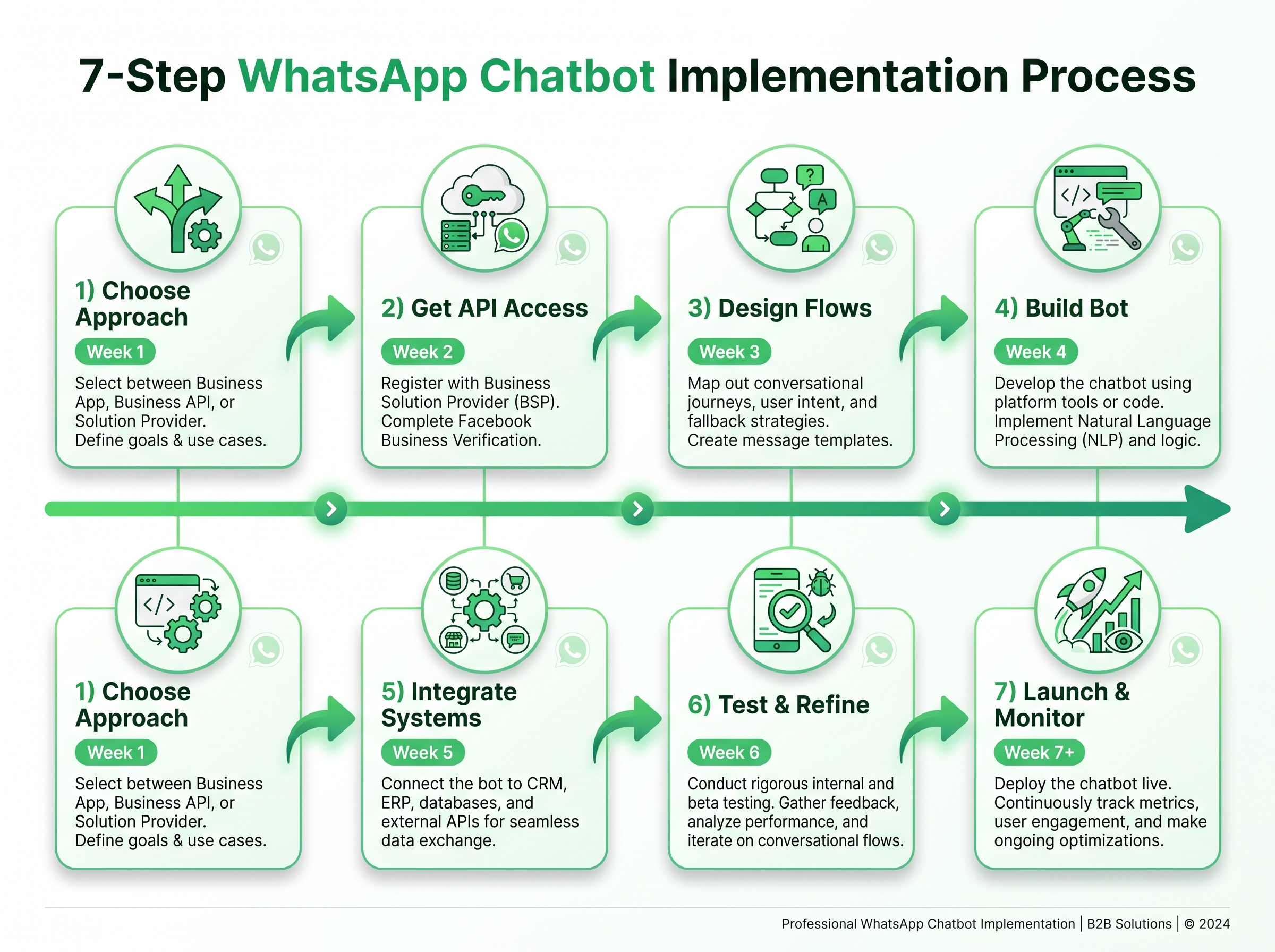
Step 1: Choose Your Approach (Week 1)
1st Option: No-Code Platforms
- Best for: Small businesses, simple use cases, quick deployment
- Examples: SendPulse, Gallabox, Wati, Kommo
- Pros: Quick setup, no technical skills needed, visual builders
- Cons: Limited customization, ongoing platform fees, vendor lock-in
- Cost: R500-R5,000/month
2nd Option: Low-Code Solutions
- Best for: Medium businesses, moderate complexity, existing tech stack
- Examples: n8n, Make (Integromat) + WhatsApp API
- Pros: More flexibility, workflow automation, extensive integrations
- Cons: Some technical knowledge required, setup complexity
- Cost: R300-R2,000/month + setup costs
3rd Option: Custom Development
- Best for: Large businesses, complex requirements, unique needs
- Technology: Node.js, Python, WhatsApp Business API
- Pros: Full control, unlimited customization, proprietary solution
- Cons: Requires developers, higher upfront cost, ongoing maintenance
- Cost: R50,000-R500,000+ development
Decision Matrix:
| Factor | No-Code | Low-Code | Custom |
|---|---|---|---|
| Setup Time | 1-2 weeks | 2-4 weeks | 2-4 months |
| Technical Skills | None | Basic | Advanced |
| Customization | Limited | Moderate | Unlimited |
| Monthly Cost | R500-R5,000 | R300-R2,000 | R5,000+ |
| Best For | Small business | Medium business | Enterprise |
Step 2: Get WhatsApp Business API Access (Week 1-2)
- Apply through Meta Business Partner (like Wiggle Digital) or directly via Meta
- Verify your business with Meta (submit business registration documents)
- Set up Business Manager and configure your business profile
- Configure your phone number (must not be active on WhatsApp)
- Wait for approval (typically 1-5 business days)
Important: Once a number is migrated to Business API, it cannot be used on regular WhatsApp again.
Step 3: Design Conversation Flows (Week 2-3)
Map the Customer Journey:
- Identify all customer touchpoints
- Determine which interactions can be automated
- Design conversation trees for each use case
- Create fallback scenarios for unknown queries
- Plan human handoff triggers
Best Practices:
- Keep conversations natural and conversational
- Use buttons and quick replies to guide users
- Always provide an escape route to human support
- Test flows with real users before launch
Step 4: Build the Chatbot (Week 3-6)
Technical Implementation:
- Set up your development environment
- Configure WhatsApp API connection and webhooks
- Build conversation logic and response handlers
- Integrate AI/NLP if using an AI-powered approach
- Implement error handling and logging
- Test thoroughly with various scenarios
Key Components:
- Webhook endpoint to receive messages
- Message processing engine
- Response generation system
- Conversation state management
- Integration connectors
Step 5: Integrate Systems (Week 4-6)
Common Integrations:
- CRM: HubSpot, Salesforce, Zoho, Pipedrive
- E-commerce: Shopify, WooCommerce, Magento
- Payment Gateways: PayFast, Stripe, PayPal
- Email Marketing: Mailchimp, Klaviyo, SendGrid
- Analytics: Google Analytics, Mixpanel, Amplitude
Integration Benefits:
- Sync customer data across platforms
- Trigger automated workflows
- Personalize responses based on customer history
- Track ROI and performance metrics
Step 6: Test & Refine (Week 6-7)
Testing Phases:
- Internal Testing: Team members test all flows
- Beta Testing: Select customers use the bot
- Feedback Collection: Gather input and identify issues
- Refinement: Improve conversations based on feedback
- Load Testing: Ensure system handles expected volume
What to Test:
- All conversation paths
- Edge cases and error scenarios
- Integration functionality
- Response times
- Mobile experience
Step 7: Launch & Monitor (Week 7+)
Launch Strategy:
- Soft Launch: Start with a subset of customers
- Monitor Performance: Track key metrics daily
- Gather Feedback: Continuously collect user input
- Iterate: Make improvements based on data
- Scale: Gradually increase usage and promotion
Key Metrics to Track:
- Conversation volume
- Response accuracy
- Customer satisfaction scores
- Human handoff rate
- Conversion rates
- Cost per conversation
WhatsApp Business API Pricing: Complete Investment Guide (2026)
Understanding WhatsApp Business API Costs
Meta Conversation-Based Pricing:
| Conversation Type | Cost per Conversation | Description |
|---|---|---|
| User-Initiated | R0.30 – R0.50 | Customer starts the conversation |
| Business-Initiated (Marketing) | R0.80 – R1.20 | Promotional messages, newsletters |
| Business-Initiated (Utility) | R0.40 – R0.60 | Order updates, appointment reminders |
| Business-Initiated (Authentication) | R0.50 – R0.80 | OTPs, verification codes |
Note: Prices vary based on Meta’s regional pricing and may change. Check current rates with your Business Solution Provider.
Platform & Software Costs
| Solution Type | Monthly Cost | Setup Cost | Best For |
|---|---|---|---|
| No-Code Platform | R500 – R5,000 | R0 – R10,000 | Small business |
| Low-Code | R300 – R2,000 | R10,000 – R50,000 | Medium business |
| Custom Development | R5,000+ | R50,000 – R500,000 | Enterprise |
Additional Cost Considerations
Setup Costs:
- WhatsApp Business API setup: R0 – R5,000
- Phone number: R50 – R200/month
- Domain and SSL: R100 – R500/year
Ongoing Costs:
- Server hosting (custom): R200 – R2,000/month
- AI/NLP services: R500 – R5,000/month
- Integration development: R10,000 – R100,000 (one-time)
- Maintenance: 15-20% of development cost annually
Total Monthly Cost Examples
Small Business (Simple Bot):
- Platform: R1,000
- Conversations: R500 (1,000 user-initiated)
- Phone: R100
- Total: ~R1,600/month
Medium Business (AI Bot):
- Platform: R2,500
- AI services: R2,000
- Conversations: R2,000 (5,000 mixed)
- Phone: R150
- Total: ~R6,650/month
Enterprise (Custom Solution):
- Development amortized: R8,300
- Hosting: R2,000
- AI services: R5,000
- Conversations: R10,000 (20,000+ mixed)
- Maintenance: R5,000
- Total: ~R30,000+/month
ROI Considerations
Cost Savings:
- Reduced support staff costs: 30-50% savings
- Lower call center expenses
- Decreased SMS marketing costs
Revenue Increases:
- Increased sales conversion: 20-40% improvement
- Higher customer lifetime value
- Reduced cart abandonment
Intangible Benefits:
- 24/7 availability (priceless)
- Improved customer satisfaction
- Competitive advantage
- Scalable operations
Typical ROI Timeline: 3-6 months for most businesses
Top WhatsApp Chatbot Platforms: 2026 Comparison
No-Code Platforms
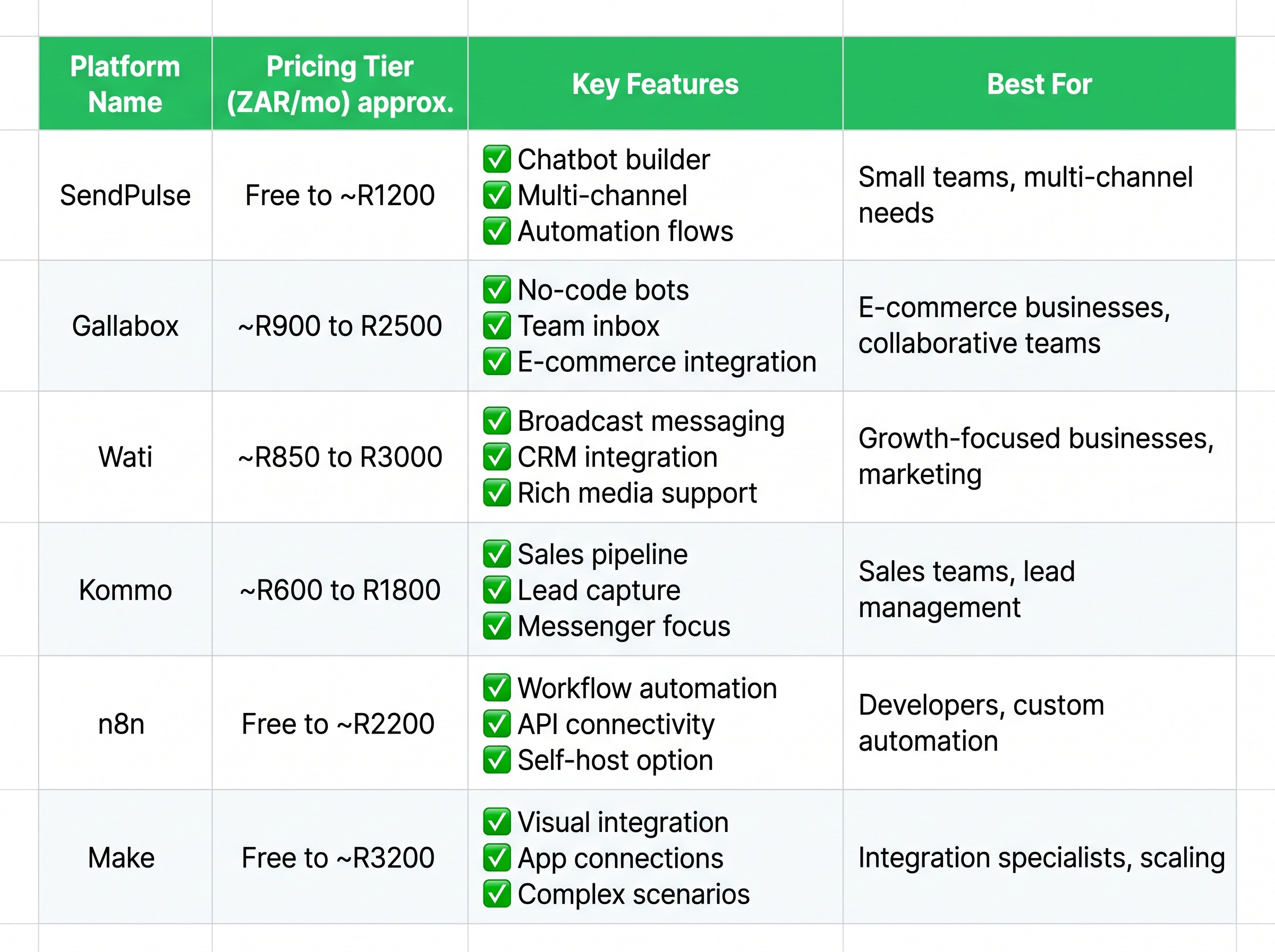
SendPulse
- Pricing: Free tier (1,000 sessions/month), then R500+/month
- Key Features: Visual chatbot builder, multi-channel support (WhatsApp, Telegram, Facebook), broadcast messaging
- Best For: Small businesses getting started with automation
- Pros: Generous free tier, easy to use
- Cons: Limited advanced features
Gallabox
- Pricing: R1,000+/month
- Key Features: AI-powered conversations, lead qualification, shared team inbox, 500+ South African businesses using
- Best For: Sales-focused businesses
- Pros: Strong AI capabilities, good local support
- Cons: Higher price point
Wati
- Pricing: R1,500+/month
- Key Features: Shared team inbox, broadcast messaging, Shopify integration, multi-agent support
- Best For: E-commerce businesses
- Pros: Excellent Shopify integration, team collaboration
- Cons: Limited customization
Kommo
- Pricing: R800+/month
- Key Features: CRM integration, sales pipeline automation, visual builder, lead tracking
- Best For: Sales teams and CRM-heavy businesses
- Pros: Built-in CRM, sales-focused features
- Cons: Steeper learning curve
Low-Code/Integration Platforms
n8n
- Pricing: Free (self-hosted), R500+/month (cloud)
- Key Features: Workflow automation, 400+ integrations, self-hosted option, visual workflow builder
- Best For: Tech-savvy businesses wanting flexibility
- Pros: Extremely flexible, cost-effective
- Cons: Requires technical knowledge
Make (Integromat)
- Pricing: R300+/month
- Key Features: Visual workflow builder, WhatsApp API integration, extensive app connections
- Best For: Businesses with existing tech stacks
- Pros: User-friendly, powerful integrations
- Cons: Can get expensive at scale
Custom Development
Wiggle Digital
- Pricing: Custom quote based on requirements
- Key Features: Custom chatbot development, South African market expertise, local support, integration specialists
- Best For: Businesses with unique requirements
- Pros: Tailored solutions, local expertise, ongoing support
- Cons: Higher upfront investment
Platform Selection Criteria
When choosing a platform, consider:
- Ease of use vs. customization needs
- Integration capabilities with your existing tools
- AI/NLP features for your use case complexity
- Scalability for future growth
- Support quality and availability
- Pricing structure and hidden costs
- South African compliance (POPIA, etc.)
Wiggle Digital’s WhatsApp Chatbot Services
Your WhatsApp Automation Partner
At Wiggle Digital, we help South African businesses harness the power of WhatsApp Business API to automate customer interactions, increase sales, and improve support operations.
Services We Offer

Chatbot Strategy & Consulting
- Use case identification and prioritization
- ROI analysis and business case development
- Platform selection guidance
- Implementation roadmap creation
Custom Chatbot Development
- AI-powered conversational experiences
- Integration with your existing systems
- Multi-language support (all 11 SA official languages)
- Advanced automation workflows
Integration Services
- CRM integration (HubSpot, Salesforce, Zoho)
- E-commerce platforms (Shopify, WooCommerce)
- Payment gateways (PayFast, Stripe, Ozow)
- ERP and accounting systems
Training & Support
- Comprehensive team training
- Ongoing maintenance and updates
- Performance optimization
- 24/7 technical support
Why Choose Wiggle Digital?
South African Expertise
- Deep understanding of the local market
- Experience with SA-specific business challenges
- Local support team in your timezone
- BEE certified for enterprise clients
AI & Automation Specialists
- Latest AI technology and NLP capabilities
- Machine learning for continuous improvement
- Natural, human-like conversations
- Future-proof solutions
Business-Focused Approach
- ROI-driven solution design
- Scalable architecture for growth
- Integration expertise
- Long-term partnership mindset
Proven Results
- 50+ successful implementations
- Satisfied clients across industries
- Measurable business outcomes
- Case studies available on request
Client Success Story
“Wiggle Digital built us a WhatsApp chatbot that handles 80% of our customer queries automatically. Our support team can now focus on complex issues, and customer satisfaction has increased by 40%. The ROI was visible within the first quarter.” — E-commerce Director, Johannesburg Fashion Retailer
Get Started Today
Free Consultation Discuss your WhatsApp automation needs with our experts. No obligation, just insights.
Email: [email protected]
Phone: +27 (0)11 123 4567
Website: www.wiggledigital.co.za/
Special Offer: Free strategy session + 20% off first month implementation for new clients
Frequently Asked Questions
Q1: Is WhatsApp Business API free?

A: The API itself is free to access, but Meta charges per conversation. User-initiated conversations cost R0.30-R0.50, while business-initiated messages cost R0.40-R1.20 depending on type (utility, marketing, or authentication). You’ll also need to factor in platform or development costs ranging from R500 to R5,000+ per month.
Q2: Can I use my existing WhatsApp number for Business API?
A: No, you need a dedicated phone number that isn’t already registered on WhatsApp. This can be a landline or mobile number. Once migrated to Business API, it cannot be used on regular WhatsApp or WhatsApp Business App again. We recommend getting a new number specifically for business automation.
Q3: How long does it take to build a WhatsApp chatbot?
A: Timeline depends on complexity:
- Simple rule-based bots: 1-2 weeks (using no-code platforms)
- AI-powered bots: 4-8 weeks
- Custom-developed solutions: 2-4 months depending on integrations and complexity
Wiggle Digital can provide a precise timeline after understanding your requirements.
Q4: Do customers need to opt-in to receive WhatsApp messages?
A: Yes, for business-initiated messages (notifications, marketing), customers must have opted in and given explicit consent. User-initiated conversations (when customers message you first) don’t require opt-in but must follow WhatsApp’s commerce policy. Always maintain proper opt-in records for compliance.
Q5: Can I send promotional messages via WhatsApp?
A: Yes, but only to users who have opted in to receive marketing messages. Marketing conversations are charged at higher rates (R0.80-R1.20 per conversation). You must follow WhatsApp’s guidelines to avoid being flagged as spam. We recommend balancing promotional content with valuable utility messages.
Q6: What languages does WhatsApp chatbot support?
A: WhatsApp supports all languages that the WhatsApp platform supports. AI-powered chatbots can be trained in multiple languages including English, Afrikaans, Zulu, Xhosa, and other South African languages. Wiggle Digital specializes in multi-language chatbots for the South African market.
Q7: How do I handle complex queries the bot can’t answer?
A: Implement a human handoff system. When the bot detects complexity, frustration (through sentiment analysis), or specific escalation keywords, it can transfer the conversation to a human agent with full context of the conversation history. Most platforms support seamless handoff to live agents.
Q8: Is WhatsApp chatbot secure for sensitive information?
A: Yes, WhatsApp uses end-to-end encryption for all messages. However, ensure your chatbot platform and integrations also follow security best practices. For highly sensitive data (banking, healthcare), implement additional authentication steps and follow POPIA (Protection of Personal Information Act) guidelines in South Africa.
Q9: Can I integrate WhatsApp chatbot with my existing CRM?
A: Yes, most modern chatbot platforms offer CRM integrations. Popular CRMs like HubSpot, Salesforce, Zoho, and Pipedrive can be integrated. Custom integrations are also possible using APIs. Wiggle Digital specializes in complex integrations with South African business systems.
Q10: What’s the difference between WhatsApp Business App and API?
A:
- WhatsApp Business App: Free, designed for small businesses, manual messaging, limited automation (quick replies, away messages), single user
- WhatsApp Business API: For medium to large businesses, automated messaging at scale, chatbot capabilities, multi-user support, integration options, paid per conversation
If you’re handling more than 100 conversations per day or need automation, the API is the right choice.
Ready to Automate Your WhatsApp?
Summary
WhatsApp Business chatbots represent a massive opportunity for South African businesses to improve customer engagement, reduce operational costs, and scale their operations. With 96% of South Africans using WhatsApp, it’s the most effective channel to reach your customers where they already are.
Key Takeaways
WhatsApp has unmatched engagement rates (90%+ open rates vs 20% for email)
Chatbots can automate 60-80% of customer interactions, freeing your team for high-value work
Multiple implementation options exist from R500/month no-code solutions to custom enterprise platforms
ROI is typically achieved within 3-6 months through cost savings and increased conversions
South African businesses have unique advantages with local expertise and market understanding
Your Implementation Roadmap
- Define your use cases—identify high-volume, repetitive interactions
- Choose your platform approach—no-code, low-code, or custom
- Get WhatsApp Business API access—apply through Meta or a Business Solution Provider
- Build and test your chatbot—start simple, iterate based on feedback
- Launch and optimize—monitor metrics, continuously improve
Why Choose Wiggle Digital
We combine technical expertise with deep understanding of the South African market to deliver WhatsApp automation solutions that drive real business results. From strategy to implementation to ongoing support, we’re your partner in conversational AI.
Get Started Today
Book Your Free Strategy Session
Let’s discuss how WhatsApp automation can transform your business. Our experts will analyze your needs and recommend the best approach for your goals and budget.
Email: [email protected]
Phone: +27 (0)81 419 4588
Website: www.wiggledigital.co.za
Downloadable Resources
Download: The WhatsApp Chatbot Planning Workbook Plan your automation strategy step-by-step with our comprehensive workbook.
Download: WhatsApp Automation ROI Calculator Estimate your potential return on investment with our custom calculator.
Last Updated: July 2026
Word Count: ~3,200 words
Ready to transform your customer communication? Contact us today for a free consultation.